
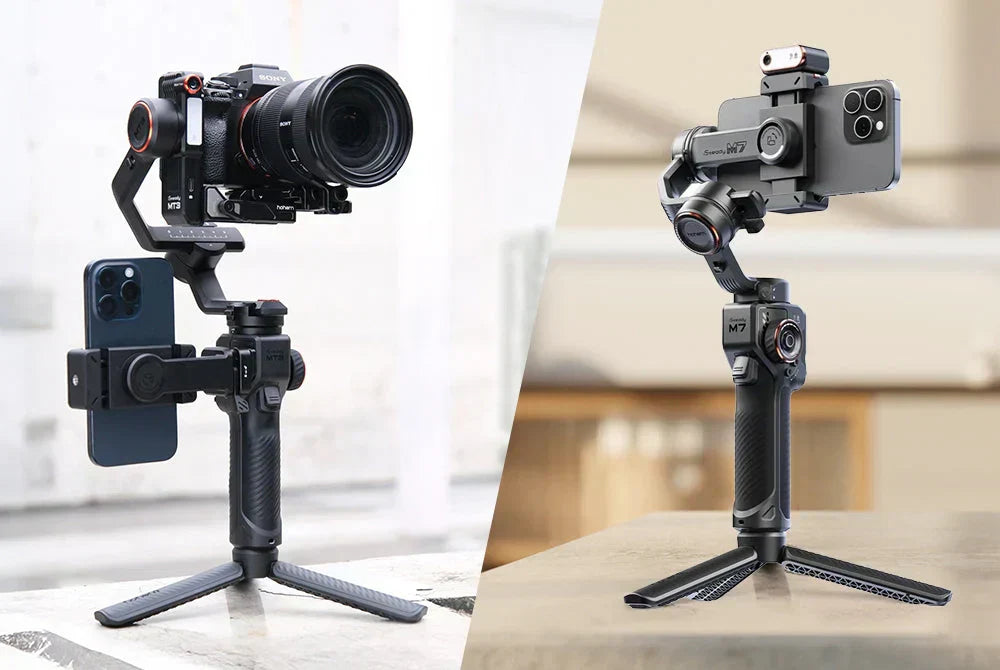
When searching for a “tripod for gimbal,” you’ll often come across results meant for traditional photography setups, especially heavy tripod heads designed for large camera lenses. But that’s not really what most gimbal users are looking for.
This guide focuses on tripods designed to work with handheld stabilizer gimbals like Hohem’s, helping turn your gimbal from a purely handheld tool into a more flexible, hands-free filming setup. Whether you’re filming solo content, recording an AI-tracked time-lapse, or setting up a simple desk livestream, adding the right tripod gives you more shooting options without complicating your setup.
What Is a Tripod for a Gimbal and Why You Need One
A tripod for a gimbal is any three- or four-legged stand that accepts a standard 1/4"-20 mounting thread: the same universal screw found on the base of nearly every Hohem gimbal. When you attach your gimbal to a tripod, you convert it from a handheld stabilizer into a stationary or low-movement filming platform, with the gimbal's motors still active and ready to track.
That combination unlocks use cases that pure handheld shooting can't cover:
- AI subject tracking without an operator holding the gimbal
- Time-lapse and hyperlapse sequences, where the camera must stay perfectly still between frames
- Talking-head shots where you want professional framing without a second person on set
- Group photos and selfies with remote shutter control
- Live streaming from a fixed desk position
Without a tripod, your gimbal is limited to movement shots. Add one, and the same device doubles as a hands-free automated camera operator.
Tripod for Gimbal vs Standard Camera Tripod: Key Differences
Not every tripod is the right fit for a gimbal setup. Here's what to check before buying:
Mounting Thread
Most gimbals use the standard 1/4"-20 mounting thread, which means they’ll work with the majority of consumer tripods right out of the box. The only time compatibility can become an issue is with larger professional video tripods that use a 3/8" thread instead. In those cases, you’ll simply need a small thread adapter.
Weight Rating
Unlike DSLR setups, gimbals are relatively lightweight. Most Hohem gimbals weigh under 1 kg even with a phone or camera attached, so using a heavy-duty tripod rated for 5–10 kg is usually unnecessary. A tripod with a 1.5–3 kg load capacity is typically more than enough while staying lighter, smaller, and easier to travel with.
Foldability and Travel Size
One of the biggest advantages of a handheld gimbal is portability, so it makes sense to pair it with a tripod that’s just as easy to carry around. Compact tripods that fold down to under 40 cm and weigh less than 400 g are ideal for travel and everyday shooting. For most creators, a mini tripod or extendable hybrid offers a better balance of convenience and flexibility than a full-size photography tripod.
The 4 Types of Tripods That Pair With a Gimbal
Not all tripods serve the same purpose in a gimbal workflow. Here's how the main form factors break down:
1. Mini / Tabletop Tripod
This is the compact three-legged stand that ships with most Hohem gimbals in the box. Typically 10–20 cm tall when opened, it gives you a stable base for desk setups, low-angle B-roll, and group selfies. It's not designed for standing head-height shots, but for static and AI-tracking applications at table or floor level, nothing beats its simplicity and pocketability.
2. Extendable Gimbal Tripod (Selfie-Stick Hybrid)
This is the most versatile option for most Hohem users. A product like the Hohem H58 extends from a compact tripod base into a selfie stick up to 58 cm long, giving you multiple configurations in one. Use it collapsed as a stable desk stand, extended for overhead or elevated angles, or locked with legs out for mid-height AI tracking shots. If you only buy one accessory for your gimbal, an extendable tripod hybrid is the one.
Explore the gimbal tripod for phone options Hohem offers for this exact use case.
3. Full-Height Travel Tripod
For talking-head content where eye-level framing matters, a travel tripod in the 60–150 cm range is the right tool. These are compact enough to fit in a carry-on, sturdy enough to hold a loaded gimbal steady, and tall enough to get the camera to standing eye height. Look for models with ball-head mounts that accept the 1/4"-20 thread.
4. Vertical-Mode Tripod
TikTok, Reels, and YouTube Shorts creators who shoot in portrait orientation need a tripod that supports vertical framing without improvised workarounds. Some extendable gimbal tripods support portrait mounting natively. If your content is primarily vertical-first, verify the tripod you choose accommodates a gimbal in portrait mode before buying.

How to Match a Tripod to Your Hohem Gimbal
Different Hohem gimbals suit different tripod configurations. Here's how to match them:
Phone Gimbals
Hohem's mobile gimbal stabilizers: including the X3, V3, M6, and M7: all use the 1/4"-20 base thread and weigh between 230 g and 390 g loaded. Any tripod rated for 1 kg or more is sufficient. The Hohem iSteady M7 handles phones up to 400 g, so verify your tripod can handle the combined gimbal-plus-phone weight, especially if you're using a Pro Max model with accessories.
Camera Gimbals
The iSteady MT3 Pro camera gimbal stabilizer loaded with a mirrorless body and lens can weigh up to 1.5–2 kg. For this configuration, skip mini tripods entirely. You need a travel tripod rated for at least 2.5 kg with a stable spread and non-slip feet on the legs.
Action Camera Gimbals
The iSteady Pro 4 is Hohem's lightest gimbal category. Most Pro 4 users find the built-in feet sufficient for static shots. If you're after more height or want to use AI tracking hands-free, a mini tripod or compact extendable stand works well here without needing anything heavy-duty.
Top Tripod Picks for Hohem Gimbal Users in 2026
These are the configurations that cover most Hohem users:
Hohem H58 Extendable Tripod
Extends from a desk-height base to 58 cm. Works with all Hohem phone gimbals. Designed specifically for the Hohem ecosystem, so the thread fit and weight rating are a guaranteed match. Best all-rounder for mobile gimbal users.
Hohem TP10 Mini Tripod
The Hohem TP10 is a compact, foldable mini tripod designed for simple everyday setups. It works well for desk livestreams, AI tracking at table height, and low-angle filming without taking up much space. Some Hohem gimbals already include it in the box, but it’s also available separately if you need an extra or replacement stand.
Compact Travel Tripod (Third-Party, 1/4"-20 Thread)
If you regularly film talking-head videos or need eye-level framing, a lightweight travel tripod is a practical addition to your setup. Models in the 100–150 cm range with a 2–3 kg load capacity are usually more than enough for most Hohem camera gimbals. Aluminium and carbon fibre options are both good choices, especially if portability matters.
Gorilla-Style Flexible Tripod
Flexible tripods are useful when you’re shooting outdoors or working in spaces without a flat surface nearby. Their bendable legs can wrap around poles, railings, or uneven objects to help secure your setup. They’re not meant to replace a standard tripod, but they can be a handy secondary option for travel or outdoor filming.
Browse the full range of Hohem's camera stabilizers to see which accessories pair with each model.
5 Filming Setups Where a Tripod + Gimbal Combo Wins
1. Solo Vlogger Talking-Head With AI Tracking
Set the gimbal on a full-height tripod, enable AI subject tracking, and start your video. The gimbal's motors follow you as you move, keeping you in frame without an operator. Result: smooth, tracked footage without paying for an extra crew member.
2. Time-Lapse / Hyperlapse
Mount the gimbal on a mini or extendable tripod, lock all three axes, and let the camera capture a slow scene change over minutes or hours. The gimbal keeps the frame perfectly still while the world moves around it.
3. Live Stream Desk Setup
Place the mini tripod on your desk and point the gimbal-mounted phone at your seating position. The gimbal handles any minor camera movement or vibration, giving your stream a cleaner, more professional image than a standard phone mount.
4. Group Photos With Remote Shutter
Set up the gimbal on a tripod, frame the group shot, and trigger the shutter with Hohem's app or a Bluetooth remote. Everyone's in the shot, the frame is locked, and you're not running back and forth to the camera.
5. Low-Angle B-Roll
Place the mini tripod on the ground and shoot upward. The gimbal's tilt range lets you dial in angles that a fixed tripod mount can't achieve without custom rigging. This setup is particularly effective for dynamic product shots or environmental establishing footage.
FAQ
Can I use a regular camera tripod with my Hohem gimbal?
Yes, as long as the tripod has a 1/4"-20 thread on its head, which covers nearly all consumer and prosumer photography tripods. Some heavy-duty video tripods use a 3/8" thread: for those, pick up a simple thread adapter.
What's the maximum height a gimbal tripod should be?
There's no hard limit, but most gimbal-plus-tripod setups are used at table height (15–30 cm) or eye level (150–170 cm). Anything taller introduces stability concerns. If you need overhead shots, a boom arm is a more stable solution than extending a tripod to its maximum reach.
Is a mini tripod enough for AI tracking?
For seated or desk-level AI tracking, yes. For full-body tracking where you need the camera at standing eye height, a mini tripod won't cut it. Use an extendable tripod or a full travel tripod for that scenario.
Can I use a tripod with the Hohem M7 / V3 Ultra / MT3 Pro?
All three models have the 1/4"-20 base thread. The M7 and V3 Ultra pair well with mini or extendable tripods. The MT3 Pro, loaded with a mirrorless camera, needs a sturdier base: a travel tripod rated for at least 2.5 kg is recommended.
Are gimbal tripods airline-safe?
Mini and extendable gimbal tripods have no restricted components and carry on without issue. Full travel tripods may need to go in checked luggage depending on their packed length. Always check your airline's carry-on length limits before travel.
Ready to Go Hands-Free?
The right tripod is the accessory that unlocks the hands-free potential of your Hohem gimbal. Whether you're building a desk live stream setup, shooting solo talking-head content, or capturing AI-tracked footage without an operator, a well-matched stand makes it possible. Browse Hohem's camera stabilizers and mobile gimbal stabilizers collections to find the right combination for your workflow.
Dejar un comentario
Todos los comentarios se revisan antes de su publicación.
Este sitio está protegido por hCaptcha y se aplican la Política de privacidad de hCaptcha y los Términos del servicio.