
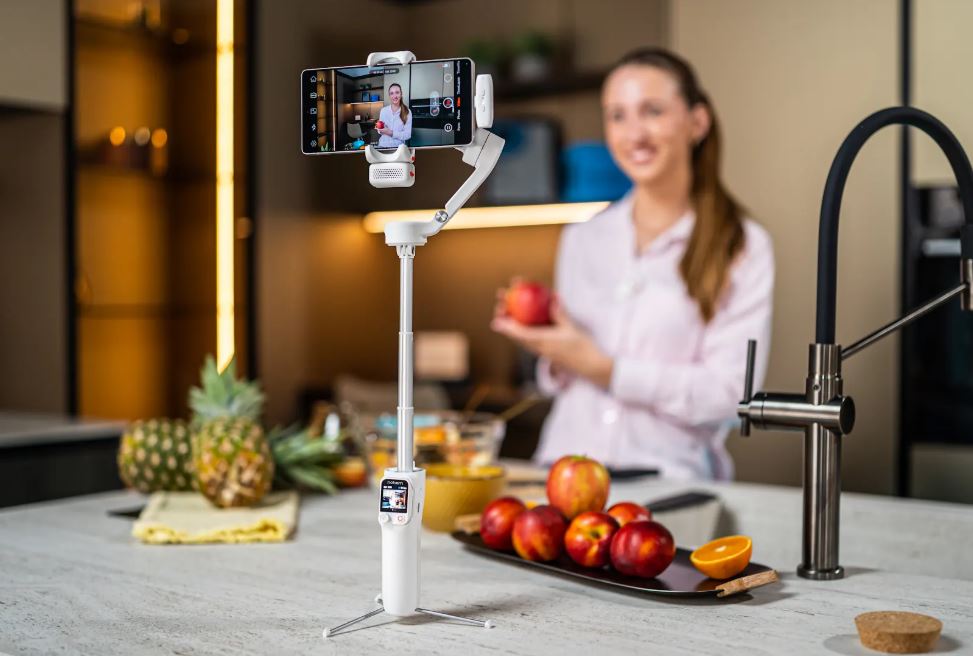
When shooting on video without a camera operator used to be a thing, you would have to place your phone in some books and hope for the best, or hold the phone at arm's length and struggle with shaky, awkward shots. None of these will create the type of video that performs well on social platforms or looks good enough to be a brand representation.
The great thing is that it has become much easier to film solo in the past 2 years. The AI-tracking gimbals now track you in real time as you move, frame in real time, and enable hand-gesture start/stop recording. No assistant needed. No application in the background. You, your phone, and a stabilizer to do the camera work.
Ideas, time, and focus are all things that matter. Choices of equipment, time, and focus are all important.
Why Solo Filming Is Harder Than It Looks
Anyone who has attempted to shoot a video with a talking head solo will confirm that it's not as easy as it sounds to get right. It can add up to a lot of problems.
The first is framing. If you are standing in front of the camera and behind the camera, you can't see what the shot looks like while shooting the scene. You place the frame and walk in and hope you are in the right spot. You may not notice if you move a couple of inches while taking, but you will find out when you look at the video later.
There's also motion. The camera has to follow you around for walk-and-talk videos, product demos, and location-based content. Conventional scenarios require a second individual for this. If you don't have one, you can only shoot in a single frame, which is much less lifelike than what creatives with a crew can do.
And lastly, the start/stop issue. After each shot, record by walking back to the camera to press the button, which takes up time and disrupts the performance. After the 3rd or 4th take, most solo creators are frustrated and pressured to rush their content.
AI tracking gimbals overcome all three of the above. The gimbal follows your face or body as you move, holds you in the frame and allows you to trigger remote recording. It's not a minor improvement. It alters the possibilities of the one-person producer.
The 4 Essential Tools for a Solo Filming Setup
1. A Gimbal with Built-In AI Tracking
This is the centerpiece of any hands-free filming setup. A gimbal stabilizer with on-device AI tracking uses a built-in vision sensor to detect and follow your face or body. As you move left, right, or toward the camera, the motorized axes adjust in real time to keep you in frame.
The key distinction is on-device tracking versus app-dependent tracking. App-based tracking requires a companion app running on your phone, which can drain battery, limit your choice of camera app, and sometimes lose connection mid-shoot. On-device tracking runs entirely on the gimbal's own hardware. Your phone stays free to use whatever camera app you prefer, and the tracking is more responsive because there is no Bluetooth lag in the loop.
Gesture controls take this further. With Hohem's AI gimbals, you can start recording, switch modes, or take a photo by raising a hand gesture toward the gimbal's sensor. That means you can walk into your shot and begin filming without touching anything.
2. A Tripod or Surface Mount
For any stationary setup, you need a stable base. Handheld gimbal shots are great for walk-and-talk content, but talking-head videos, tutorials, and live streams all benefit from a fixed position.
A compact tripod that pairs directly with your gimbal is the simplest option. Hohem's mini tripod attaches to the base of any iSteady gimbal and gives you a stable desktop or tabletop mount. For taller setups, a full-height tripod with a standard quarter-inch thread works with any Hohem model.
The advantage of using a gimbal on a tripod (rather than just a phone clip) is that you still get active stabilization and AI tracking. Even in a fixed position, the gimbal can pan and tilt to follow you as you shift around, which keeps your content dynamic without any crew involvement.
3. The Right Camera Height and Angle
Most solo content creators don't realize the importance of camera placement. The single best default for talking-head content is to place the lens at eye level or just above. This results in a natural and flattering shot that looks like a real conversation.
The camera angle below (up at the phone) is unflattering and looks like the camera was shooting on purpose instead of being a direct result of the incident. At a high elevation, the shot can become awkwardly angled down, which may seem impersonal.
If set up at a desk, place the tripod on a riser or shelf so that the lens is at eye level. Standing, use a tripod or extend it to full height, or use a shelf-mounted rig. The small changes here can really go a long way towards making the final project look professional.
4. Lighting
The second deciding factor for solo content is lighting, another area where many people tend to skimp. If the window light is natural, it's fine as long as you shoot towards it during the day, but it can change over time and is unavailable for evening shots.
There are a few Hohem gimbals with built-in fill lights, which eliminate the need to add additional gear. Both the M7 and V3 Ultra have CCT and RGB lighting, which are adjustable in the gimbal body. In CCT mode, you will have clean white light, which will complement the natural light or indoor lighting sources. RGB mode allows for colour washes for creative looks, lower thirds accents, or mood lighting.
The built-in light is sufficient for close-up and medium shots for those who regularly shoot indoors. If you are shooting with two or more people or a wide shot, add a stand-alone ring light or panel light at approximately 45 degrees to your face.
Step-by-Step: Setting Up Your Solo Filming Rig
Here is the exact process to go from unboxing to recording in about five minutes:
Step 1: Balance your phone on the gimbal. Slide your phone into the gimbal's clamp and adjust the position until it sits level without the motors running. Every Hohem gimbal has an adjustable phone holder with clear balance markings. Getting this right before you power on prevents motor strain and ensures smooth operation throughout your shoot.
Step 2: Mount the gimbal to your tripod. Attach the mini tripod or full-height tripod to the gimbal's base mount. Position the whole rig at your desired height. For seated setups, the camera lens should be at eye level. For standing setups, raise the tripod or use a shelf.
Step 3: Power on and activate AI tracking. Turn the gimbal on and press the tracking button. On the M7, this activates the on-device AI vision sensor, which immediately starts scanning for faces. On the V3 and V3 Ultra, tracking is activated through the Hohem Joy app or via the gimbal's built-in controls. Once your face is detected, a tracking lock appears and the gimbal begins following you.
Step 4: Set your frame. With the M7, you can use the detachable remote's built-in screen to see a live preview of your shot from anywhere in the room. This lets you confirm framing, background, and lighting before you start recording. For the V3 models, position yourself in front of the camera and check the phone's screen before stepping into your final mark.
Step 5: Use gesture control to start recording. Raise your hand toward the gimbal to trigger recording via gesture control. Once the gimbal detects the start gesture, your phone begins recording and you are free to present, move, and create without walking back to the camera. When you are done, use the same gesture to stop. No buttons, no remote, no interruptions.
If you prefer physical control, the V3's detachable remote gives you a tactile alternative. Clip the remote to your belt or hold it in your off-camera hand and trigger recording, pan, and tilt adjustments from wherever you are standing.
Best Hohem Gimbals for Solo Filming
Hohem iSteady M7: Best for Creators Who Move Around![]()

The iSteady M7 is the top recommendation for solo creators who need to walk, shift positions, or film in multiple locations during a single session. The on-device AI tracks you without app dependency, the extension pole adjusts your angle on the fly, and the built-in CCT and RGB fill light keeps your face properly lit whether you are indoors or out.
This is the gimbal for vloggers, course creators, social media managers, and anyone producing content where they are both the subject and the operator.
Hohem iSteady V3 Ultra: Best for Stationary Setups

If most of your solo filming happens at a desk, a kitchen counter, or a fixed outdoor spot, the V3 Ultra gives you what you need without the higher price tag of the M7. The detachable remote controller lets you trigger recording and adjust the gimbal from across the room, and the 360-degree RGB lighting adds creative flair that standalone lights cannot match at this size.
It is also the most compact option here, folding down to a size that fits easily in a drawer or travel bag.
Hohem iSteady V3: Best Entry Point for Solo Beginners

Common Solo Filming Mistakes and How to Fix Them
Drifting out of frame: This happens when the sensitivity of the tracker is set too low or when the pan range of the gimbal is exceeded. The solution: make the tracking more sensitive in the settings and keep within a natural arc in front of the camera. When covering a larger area, move the tripod instead of using the motors to move it to extreme angles.
Unstable footage during walk and talk shots: If your footage is still shaky when walking around and in lock mode, you are probably in lock mode during walk and talk shots. Lock mode is a feature that forces the camera to look in the same direction and is counteractive to your natural walking gait. In follow mode, the pan/tilt axes move with you instead of against you.
Lighting that is flat and unflattering: Overhead room lights cast harsh shadows under the eyes and the chin. There's a simple solution to this: simply switch on the fill light on the gimbal and position it at a 45-degree angle to your face. When using natural light, sit in front of a window, not behind it.
Phone falls out of balance: If the phone has fallen out of balance and the moving motors are heard to be strained, or the phone is falling towards one side, then you missed the manual balancing step. Turn the power off and adjust the position of the phone in the clamp so that the phone is flat on its own; then turn the power on again. Balancing before the motors activate increases battery life and creates a smoother look while shooting footage.
Ready to film solo like a pro? Explore Hohem AI tracking gimbals built for creators who work alone. Browse the full collection and find the right model for your setup.
Jätä kommentti
Kaikki kommentit moderoidaan ennen julkaisemista.
Tämä sivu on suojattu hCaptcha-tunnistuksella, ja hCaptchan tietosuojakäytäntöjä ja käyttöehtoja sovelletaan.